
Home > Scientific Calculators > fx-9910CW
fx-9910CW
ClassWiz® advanced scientific calculator
The fx-9910CW 2nd Edition ClassWiz is an iterative enhancement to the original fx-991CW ClassWiz scientific calculator. With an all-new quadruple graded LCD display, users will be able to easily find their cursor while writing and modifying expressions.
All of the calculator's functions can be accessed through the convenient Math Catalog. The Math Catalog also hosts 47 scientific constants and 40 measurement conversions. By partnering the ClassWiz with an internet-capable mobile device, solutions can be graphed and visualized through ClassPad.net by scanning a QR code on the calculator's screen.

What's New?
Menu shortcuts.
Numbered menu items for lightning-fast access.

Improved key labeling.
Easily identifiable, high contrast navigation keys.
.png)
New Catalog List
Shift+Catalog brings up a list of common functions.

Bright and sharp under any lighting condition.
Improved power source.

Released in 2025 in the US, the Casio fx-9910CW is an iterative improvement to the 2023 Casio fx-991CW.
The ClassWiz family of calculators feature circular, convex buttons that are appropriately spaced to prevent the mis-keying of information, and the button labels feature glyphic representations of the functions they perform. The hard plastic case features an etched edge surface to prevent slipping in the hand. The ClassWiz can store and recall up to nine variables which can contain integers, computations, and functions. Variables are retained in the calculator's memory between sessions - a feature highly requested by educators worldwide.
Graphing without a grapher? Incredible!
Step 1:
Perform your calculation and get the result, like completing a table for f(x),g(x).


Step 2:
Generate a QR code with [SHIFT]+[x] and scan it with your external device.


Step 3:
Visualize the result using ClassPad Math's scratch pad, table, graph, or number line.

Step 4:
Perform your analysis such as finding intersections, roots, modifying the graph, and much more.


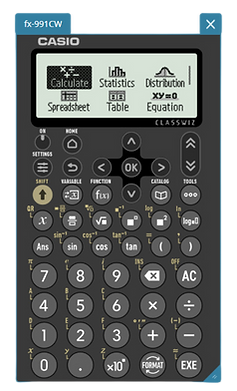
fx-9910CW emulator
The ClassWiz emulator is our first OS-agnostic digital translation of hardware technology. The emulator can be accessed through ClassPad.net as a 'sticky.' The ClassWiz sticky features keystroke history, calculator screen capture, and integration with other ClassPad Math stickies such as the graph and table visualizers.

Want to buy in person?
Look for me at a retail store near you.


Manuals and Guides
Casio calculator manuals and quick start guides help users make better use of their devices faster. Get the fx-9910CW user manual below as a comprehensive resource to learn how to use your calculator.
Need more resources? Visit the Resource Library and Discussion Board for activities and tutorials.